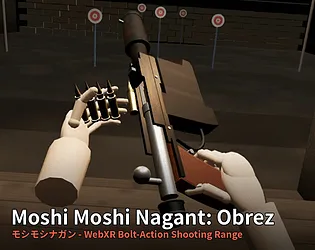
Most browser shooting ranges put a gun on your screen; this one puts a rifle in your hands. The manual bolt work is the whole appeal — fumbling cartridges under pressure is the real skill being tested — and the honest ballistics (unzeroed sights, barrel-direction bullets) give it a backyard-plinking charm. A strong pick for Quest owners, and still a competent click-and-plink for desktop players.
About Moshi Moshi Nagant: Obrez (モシモシナガン)
Moshi Moshi Nagant: Obrez is a single-file WebXR shooting range built around a fictional bolt-action rifle chambered in 7.62x54mmR — a loving riff on the Mosin-Nagant. There is no auto-reload: grab the rifle with your hand, seat the cartridges yourself, and cycle the bolt with realistic lift, pull, push and lower motions. In VR the rifle tracks your hands and vibrates appropriately; jolt the bolt roughly and the gun shakes with you.
Five ranges are on offer: Basic Shooting (5 targets, no time limit), Long Range (5 small, distant targets), Rapid Fire (45 seconds with respawning, relocating targets), One Shot One Kill (6 targets, 8 rounds) and free-form Training. Records are saved separately for VR and PC, with S/A/B/C ranks awarded per range.
No headset? The same range plays on PC with WASD and mouse. The game runs in any WebXR-capable browser — the developer tested it on Quest Browser — with no installation required, and PC VR setups are confirmed working via Virtual Desktop + Microsoft Edge. English and Japanese toggle in-game.
Two design quirks worth knowing: the iron sights are deliberately rough and not zeroed — bullets fly where the barrel points, which the developer calls part of the game, not a bug — and once VR mode activates, the browser window stops rendering by design, so recording has to happen from the headset itself.
How to Play
In VR, move a hand near the grip and squeeze to hold the rifle, then grab the bolt knob with your free hand and move it up, back, forward and down. Point at distant items and squeeze to pull them toward you, and press A/X (T on PC) to return the rifle and dropped ammo to the table. On PC, click to start, then move with WASD, aim with right-click and fire with left-click.
Controls
Move – WASD
Aim – Right click (hold)
Fire – Left click
Bolt – R
Pick up rifle – G
Ammo – E / Q / F
Reset table – T
Help – H
VR – squeeze to grip, bolt knob up-back-forward-down, A/X to reset
Tips & Tricks
- Treat the iron sights as a rough guide only — bullets follow the barrel, and the developer calls that intent, not a bug.
- Smooth, complete bolt motions keep the rifle steady; rough pulls shake your aim.
- Press T (or A/X in VR) whenever ammo scatters — it returns everything to the table.
- A fully committed hip-fire stance earns double points; a lazy lean off the sight line does not.
Features
Single-file WebXR shooting range — no installation, runs in the browser
Fictional Mosin-Nagant style bolt rifle with fully manual loading and bolt work
Five range types, from untimed basics to a 45-second rapid fire course
S/A/B/C ranks with records kept separately for VR and PC
Hand tracking and haptic feedback in VR; WASD + mouse mode on PC
English/Japanese language toggle in-game
Tested on Quest Browser; PC VR confirmed via Virtual Desktop + Edge
Latest Updates
Added to PlayBloo
A WebXR bolt-action rifle range where every cartridge is loaded by hand — in VR or on PC.. Discovered on itch.io's new releases feed and added to the PlayBloo catalogue with verified source details.
 PlayBloo