 PlayBloo
Current code status
As of November 16, 2026, PlayBloo has not independently verified an active Vox Seas code. The official Roblox description and official release trailer do not publish one. Community footage confirms that a redemption interface exists, but the inspected clips did not expose a complete code together with a successful redemption and reward.
Accordingly, this page does not label guessed strings such as RELEASE as working, does not manufacture rewards and does not maintain an expired-code table from partial screenshots. That absence is a verification decision, not a claim that the developer will never issue codes.
Where the Codes menu is
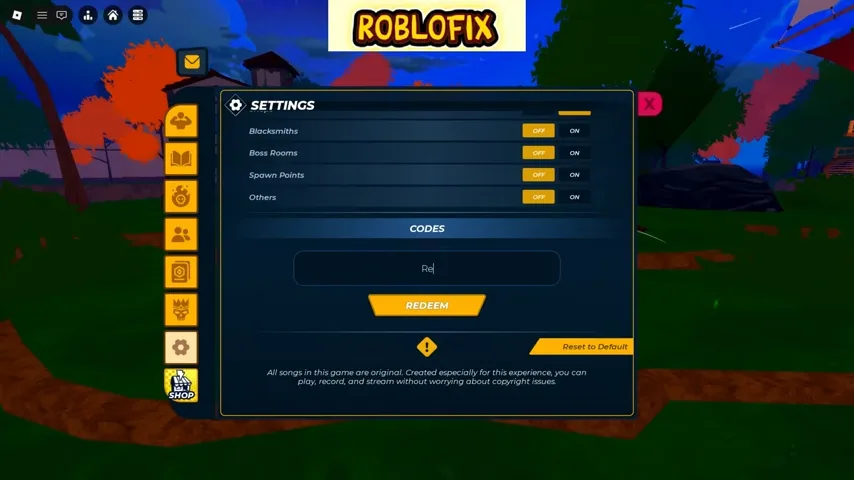
The November 15 Roblofix footage shows the Settings window, Codes field and Redeem button. PlayBloo has not redeemed a code in the live game, so these steps are an attributed interface guide rather than a hands-on redemption test.
Open the official Vox Seas experience- Open the official Vox Seas experience by the Vox Seas! group on Roblox.
- Open the left-side menu and choose Settings, represented by the gear icon in the community footage.
- Find the Codes section, enter a code exactly as published by a trustworthy source and select Redeem.
- Read the game's response in the interface; a text field alone is not evidence that a code is active or that a reward was granted.
What qualifies as a verified code
A future code should have a complete, exact string and a traceable announcement or a visible successful redemption. The official Vox Seas Roblox page, group, YouTube channel and official community announcements are the preferred sources. A cropped input field, an automatic transcript or another game's code list is not enough.
If the game rejects a string, do not assume that changing its capitalization or adding a year will unlock a variant. Check the original announcement and the in-game response instead. Codes can expire or carry conditions, so the check date matters even after a code has been verified once.